
Home » Coding » Version Control » Git
Git Setup & Consulting in Miami
Git records every change to your code as a snapshot you can return to. It is the version control system almost the entire industry runs on, and once your project is in it, no edit is ever truly lost.
- Repository Setup
- Branching & Merging
- Deployment Hooks
- Based in Miami, FL
A Complete History Of Every Change
Because every developer has the whole history on their own machine, Git works offline and there is no single copy whose loss would erase the project. That distributed design is the main thing that set it apart.
We set up repositories, branch models and deployment hooks so your team can work in parallel, review changes before they go live, and roll back in seconds when something goes wrong.

- Repository setup and migration
- Branching and merge workflows
- Automated deploys with Git hooks
- History cleanup and team training
What We Do With Git
Setting it up, cleaning it up, and making it part of how your site gets built.
Repository Setup
Your project initialized properly, with ignore rules that keep credentials, uploads, and dependency folders out of history.
Branching Workflows
A model your team can follow — feature branches, protected main, and a release process that matches how often you ship.
Merge & Conflict Resolution
Untangling branches that have drifted apart, and setting up practices that stop it happening as often.
Hooks & Automation
Pre-commit checks and post-receive deployment so standards are enforced and releases happen automatically.
History Cleanup
Removing committed secrets, shrinking repositories bloated with large binaries, and rewriting history safely when it is needed.
Team Training
Practical sessions covering the commands your team will use daily, plus how to recover when something goes wrong.
Repository in a mess?
Committed secrets, a bloated history, branches nobody understands — all of it is fixable.
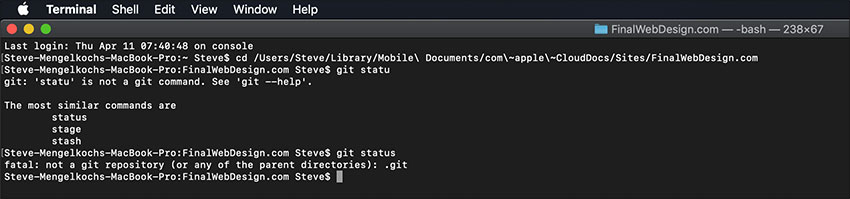
The Everyday Commands Your Team Needs
The rest — rebase, cherry-pick, bisect, reflog — are tools for specific situations. Knowing they exist matters more than memorizing them, and we cover when each one is the right answer.
We also cover the recovery commands, because the most useful thing to know about Git is that almost nothing is unrecoverable.
Visual Tools For Those Who Prefer Them
For people who prefer a dedicated app, GitHub Desktop, Sourcetree, and Fork all work well. The underlying repository is identical either way.
We set your team up with whichever tool they will actually use, and make sure the workflow is the same regardless of which one they pick.

How A Git Project Runs
Four steps, with your live site untouched until the final one.
Review
We look at your current files, any existing repository, and how your team works today.
Structure
Repository layout, ignore rules, branch model, and access permissions are agreed and documented.
Automate
Hooks and pipelines are built and tested against a staging copy of your site.
Hand Over
Your team is trained, the documentation is written, and we stay available while the new workflow beds in.
Works Well With
Git is the engine. These are the platforms and tools around it.
Recent projects: Outinord · Web Consulting Miami · CRA-MN
GitHub
Hosting, pull requests, and Actions for automated builds and deployment.
Code Editors
Editor setup, linting and debugging so every developer works the same way.
Version Control
The wider picture — workflows, staging, and deployment strategy.
Back-End Development
Servers, databases and APIs that keep your site fast, secure and easy to change.
Git Work We Do
Organized repositories and workflows your team can trust.
Repository Setup
Repositories structured and configured correctly.
Branching Strategy
A branching model that fits how your team works.
Merge Conflict Help
Tangled merges resolved without lost work.
History Cleanup
Large files and secrets removed from history.
Git Hooks
Automatic checks before code is committed.
Team Training
Practical Git training for your developers.
Git Pricing
Clear, upfront pricing for Git setup and cleanup. Every project starts with a free call and a written estimate, so you know the cost before any work begins.
Starter
Or $125/hr for custom work-
Repository setup
-
Branching workflows
-
Merge conflict resolution
-
Hooks and automated deploys
-
History and secrets cleanup
Standard
Team workflow-
Repositories for your projects
-
Branching workflow for your team
-
Pull request reviews
-
Team training
Premium
Automated deployment-
Everything in Standard
-
Automated deployments (CI/CD)
-
Staging environment
-
Automated tests on every push
-
Documentation
Git Questions We Get Asked
What is the difference between Git and GitHub?
Git is the version control software that runs on your computer and stores the history. GitHub is a company that hosts Git repositories online and adds collaboration features on top — pull requests, issues, permissions, automated pipelines. You can use Git with no GitHub account at all.
Can I undo a commit I already pushed?
Yes. The safe way is git revert, which creates a new commit undoing the change and leaves history intact. Rewriting pushed history with reset or rebase is possible but disruptive for anyone else working on that branch, so it needs coordinating first.
I committed a password. What now?
Change the password immediately — that is the part that actually matters, because the credential is exposed the moment it is pushed. Then remove it from history with a tool built for the job, force-push, and add the file to your ignore rules. Anyone who cloned the repository still has the old copy.
Why is my repository so large?
Almost always because binary files were committed — images, PDFs, video, or a dependency folder. Git keeps every version of every file forever, so a 20 MB file edited ten times is 200 MB of history. Git LFS handles large assets properly, and existing bloat can be stripped out.
Do I have to use the command line?
No. Visual Studio Code, GitHub Desktop, Sourcetree, and similar tools cover everything most people need. The command line is faster once you know it and is the only option in some recovery situations, but it is not a prerequisite for using Git well.
What is a merge conflict?
It happens when two people change the same lines in the same file and Git cannot decide which version wins. It is not an error — Git marks both versions in the file and asks a human to choose. They are far less frequent when branches are small and merged often.
Can Git deploy my website?
Yes, either through a hosting platform pipeline like GitHub Actions or with a post-receive hook on your own server. Push to a specific branch and the site updates. We set this up with a staging step first, so changes are seen somewhere safe before they go live.
Can you help recover lost work in Git?
Often, yes. Git keeps a detailed history, so we can usually recover lost commits or undo bad merges if we act before the history is cleaned up.
How much does git setup & consulting cost?
We offer three options: Starter at $299 per setup; Standard at $599 per setup (Team workflow); and Premium at $1,199 per setup (Automated deployment). Every project starts with a free consultation and written estimate, so you know the exact cost before work begins.
Get your project into Git
Tell us how your site is built and who works on it. We will tell you what it takes — and we will tell you when it is not worth doing.